Multiply Monaxa's email revenue by using these emails we've created for you
0
Emails Written
0
Live Campaigns
0
Open Rate You'll Average
$0
Cost to You
SCROLL
Seriously... Put it in 2x
(I explained everything in here)
Everything you need to turn signups into deposits. Ready to launch.
The 3 reasons you are not making way more money through emails
That means a lot of your traders are not even seeing what you send them.
The promotions tab is one step away from invisible. If your emails land there instead of the primary inbox, most people will never open them.
Less people seeing your emails = less deposits. Simple as that.
Go through the last few emails you sent.
Do they talk directly to the trader like you actually want to help them? Or do they read like a corporate announcement that nobody asked for?
This costs you more than you think. The people reading these are real humans. If you're not helping them, they stop trusting you.
Less trust = less deposits.
This is happening because you are sending the same email to everyone.
Someone who just signed up should not get the same email as someone who has been trading with you for 6 months. A person who hasn't verified yet shouldn't be getting promotional campaigns. But right now, they are.
There are specific customer flows that can tie down to the exact individual. How long they've been trading, their deposits, country, region, trading pair.
The more targeted the message, the more money it makes.
Right after someone signs up, they haven't verified yet. These emails are designed to get them to complete KYC so they can actually start using the platform.
Send: 24 hours after registration, if KYC not completed
Subject: your monaxa account is 90 percent done
Preview text: One step left and your $20 bonus unlocks.
[First name],
You registered for Monaxa. That part is done.
The one step remaining is identity verification. Without it, the account exists but the $20 No Deposit Bonus stays locked, and you cannot fund or trade.
Verification is a regulatory requirement, not a Monaxa preference. Regulated brokers are required to verify traders before allowing live activity. It takes most people under ten minutes.
Once verified, three things happen at once. Your $20 No Deposit Bonus unlocks. Your $50 Welcome Bonus becomes available on first deposit. Access opens to MT4, MT5, and cTrader with leverage up to 1:2000 and spreads from 0.0 pips on the Zero account.
All of that is sitting on the other side of one document upload.
Complete your verification now
Talk soon,
Alex / Monaxa
Send: 3 days after registration, if KYC still not completed
Subject: why we need your documents before you can trade
Preview text: This is not bureaucracy. Here is what it actually protects.
[First name],
A lot of traders see identity verification as a friction point.
It is worth explaining why it exists and what it actually protects.
Monaxa operates under Mauritius FSC and Anguilla regulation. Both require identity verification before live trading is allowed. This is not a preference, it is a condition of the license.
The reason the regulation exists is to protect you. Verification confirms that the funds in the account belong to the identified account holder. If there is ever a dispute about a deposit, a withdrawal, or account access, your verified identity is what gives you standing.
The process takes under ten minutes. You need a government-issued ID and proof of address. Upload both and the account clears.
Verified Monaxa traders right now are running live positions on 65 plus FX pairs, indices, metals, and crypto CFDs. They are using spreads from 0.0 pips on the Zero account, leverage up to 1:2000, and instant withdrawals the moment a request is submitted.
Talk soon,
Alex / Monaxa
Send: 7 days after registration, if KYC still not completed
Subject: what verified monaxa traders are doing right now
Preview text: Your account is still open. Here is what is sitting on the other side of verification.
[First name],
Your account is still open.
Seven days in, it exists but cannot do the one thing it was built to do: let you trade.
Here is what verified Monaxa traders are doing right now while your account sits in pending status.
They are using their $20 No Deposit Bonus to place live positions without having deposited a cent. They are trading from MT4, MT5, or cTrader. They are running leverage up to 1:2000 on the Standard, Pro, and Zero accounts. They are pulling profits through instant withdrawals the moment a position closes.
The minimum to start real trading is $15 on the Standard account. That is it.
But before any of that is available, the account needs to be verified. One government-issued ID. One proof of address. Under ten minutes.
If something stopped you from completing verification the first time, a question about which documents to use, a technical issue, anything, reply here and we will sort it out directly.
Otherwise the link below takes you straight to the verification step.
Talk soon,
Alex / Monaxa
Now that they're verified, it's time to actually onboard them. These emails walk them through the platform, build trust, and get them to make their first deposit.
Send: Immediately after verification
Subject: your $20 is already sitting in your monaxa account
Preview text: No deposit required. No catch. Here is what that actually means.
[First name],
Your account is verified. That means your $20 No Deposit Bonus is already sitting there, ready to trade.
No deposit required to unlock it. No second form to fill out. It is already yours.
Most traders never use it. They register, they get verified, and then life gets in the way. The $20 stays parked in an account they never log into again.
That is the friction Monaxa was built to remove.
Over the next five days, you are going to get a short series of emails covering exactly what your account can do. How the three account types compare. Which of the three platforms fits your style. How withdrawals actually work here. Why the minimum deposit is $15, not $100 or $200.
Nothing long. Nothing complicated. Just what is worth knowing upfront.
Talk soon,
Alex / Monaxa
Send: 4 hours after Email 1
Subject: what frictionless trading actually looks like in practice
Preview text: Most brokers use the word. Monaxa built the company around it.
[First name],
Most brokers use the word "frictionless" in a headline and then make you wait three business days for a withdrawal.
Monaxa built the company around that word. It is in the tagline. It is in the partnership program name. It is on every page of the site.
Here is what it actually means once your account is live.
Instant withdrawals. Not "up to 24 hours." Not "next business day." Processed the moment the request is submitted.
A $15 minimum deposit on the Standard account. Low enough that your first deposit is a test, not a commitment.
Three platforms on one account. MT4, MT5, and cTrader. Most offshore brokers give you MT4 and MT5 and stop there. The cTrader option matters for anyone running algorithmic or ECN-style execution.
The Trustpilot rating sits at 4.7 out of 5. That number is built one withdrawal, one filled order, one support reply at a time.
Talk soon,
Alex / Monaxa
Send: Day 2, morning
Subject: standard pro or zero which account actually fits you
Preview text: Three account types. One fits how you trade. Here is the math.
[First name],
Monaxa offers three live account types. Picking the wrong one costs you on every trade you place.
Here is a clean comparison.
Standard Account
Minimum deposit: $15
Spreads: from 0.5 pips
Commission: $0
Best for: casual traders who want the lowest entry and simple all-in pricing
Pro Account
Minimum deposit: $50
Spreads: from 0.1 pips
Commission: $0
Best for: active traders who want tight spreads without a separate commission line
Zero Account
Minimum deposit: $200
Spreads: from 0.0 pips
Commission: flat per-lot fee
Best for: scalpers and high-volume traders who want the tightest possible spread on every ticket
All three accounts give you leverage up to 1:2000. All three give you access to MT4, MT5, and cTrader. All three support the $20 No Deposit Bonus and the $50 Welcome Bonus.
The Cent account is also available for anyone who wants to trade in smaller denominations while they get used to the platform.
Open the account that fits you
Talk soon,
Alex / Monaxa
Send: Day 2, afternoon
Subject: mt4 mt5 ctrader which one fits how you trade
Preview text: Three platforms on one Monaxa account. Here is what each one does.
[First name],
Your Monaxa account gives you three platforms. You do not need all three. You need the one that fits how you actually trade.
MT4 is the most widely used trading platform in the world. It handles custom indicators, Expert Advisors for automated strategies, and one-click execution from the chart. Available on desktop, web, and mobile.
MT5 is the next generation. More order types, a built-in economic calendar, depth of market data, and the ability to trade stocks alongside forex from the same terminal.
cTrader is the platform most offshore brokers skip. Built for precision execution, transparent ECN pricing, and advanced order types. Favoured by scalpers and anyone running algorithmic strategies.
You can log into the same account through all three. Switch platforms without opening a new account, without reverifying, without transferring funds.
65 plus FX pairs. Indices. Metals. Energies. Stocks. Crypto CFDs. All available through whichever platform you pick.
Talk soon,
Alex / Monaxa
Send: Day 3, morning
Subject: the tools already in your monaxa account most traders miss
Preview text: Copy Trading, PAMM, The Vault, and Acadamis. Already there. Already yours.
[First name],
There are tools inside your Monaxa account that most traders find months after signing up, not at the start.
Copy Trading lets you browse live traders with verified performance histories and copy their trades in real time. You pick the trader. You set your risk parameters. The platform handles the execution.
PAMM is for traders who want exposure managed by a professional account manager with public track records. Capital stays in your account. The manager trades it.
The Vault is Monaxa's profit management feature. Lock profits separately from trading capital so a losing streak does not eat what you have already banked.
10xBoosted is available for traders who want amplified exposure on specific setups.
Acadamis is the education platform. Courses covering chart reading, risk management, trading psychology, and strategy. Not marketing content. Structured material you can actually work through.
None of this costs extra. It is already part of the account.
Talk soon,
Alex / Monaxa
Send: Day 4, morning
Subject: $20 then $50 then deposit promos how the stack works
Preview text: Three layers of bonus credit. Here is what each one actually does.
[First name],
Monaxa runs a layered bonus stack. Most traders claim one layer and never touch the other two.
Layer one: the $20 No Deposit Bonus. Already in your account. No deposit required to start trading with it.
Layer two: the $50 Welcome Bonus. Activates on your first deposit. Stacks on top of whatever capital you put in.
Layer three: recurring deposit promotions. Depending on the campaign period, Monaxa runs 30%, 50%, and sometimes 100% deposit bonuses. Timing these is how active traders stretch their effective capital without adding risk per trade.
The bonuses are credit, not withdrawable cash on day one. They let you take positions. Profits generated from those positions are yours to withdraw once the standard volume requirements are met, and the withdrawals are instant.
Read the bonus terms before you start. Every broker has them. Monaxa publishes them openly on the promotion page.
Talk soon,
Alex / Monaxa
Send: Day 4, afternoon
Subject: instant withdrawals what that actually means here
Preview text: Most brokers use the word. Here is how Monaxa processes them.
[First name],
Every broker claims fast withdrawals. Most mean "one to three business days" once you read the fine print.
Monaxa processes withdrawals instantly.
Request submitted. Funds released. The same methods you deposited with are the ones withdrawals route back through, so there is no verification delay the first time you pull capital out.
That is the operational decision that turns "frictionless" from a tagline into something you actually experience.
It also matters for how you manage risk. When withdrawals clear immediately, you can take profits off the table the moment a position hits target rather than leaving them on the platform because the withdrawal cycle feels like friction.
Client capital is held through regulated entities. Mauritius FSC GB23201577 and Anguilla A000001175.
Support runs multilingual and is reachable through the portal, email, or live chat. Withdrawal issues, when they happen, get resolved the same day.
Talk soon,
Alex / Monaxa
Send: Day 5, morning
Subject: the real reason most traders delay their first deposit
Preview text: It is not knowledge. It is not readiness. It is something else.
[First name],
The most common thing we hear from traders who verified their account and have not funded yet is the same sentence: "I will do it next week."
Next week becomes next month. The market moves. Confidence drops. The delay extends.
Here is what most traders are actually waiting for: certainty. They want to feel ready before they start.
That certainty does not arrive before the first trade. It arrives after the first ten.
The Monaxa Standard account starts at $15. That is not a capital commitment. It is the cost of seeing how your setup feels with real fills in live market conditions, not demo mode.
Your $20 No Deposit Bonus is already in the account. Your $50 Welcome Bonus activates the moment you deposit. The three platforms are ready. The instant withdrawals are ready.
You do not need a large position. You need the first one.
That is what the $15 minimum is for.
Fund your account and place your first trade
Talk soon,
Alex / Monaxa
This is where most brokerages completely drop the ball. They get the trader signed up, verified, onboarded... and then go silent. No value, no updates, nothing. It's the equivalent of going on a great first date, getting her number, and then ghosting her. And wondering why nothing happened.
This is where you start making your emails addicting. You give traders real value on a consistent basis so they keep choosing your platform over every other option. The 3 campaigns below are designed to do exactly that.
These can be used for the next 2 days or they won't make sense!
These can be used for the next 2 days or they won't make sense!
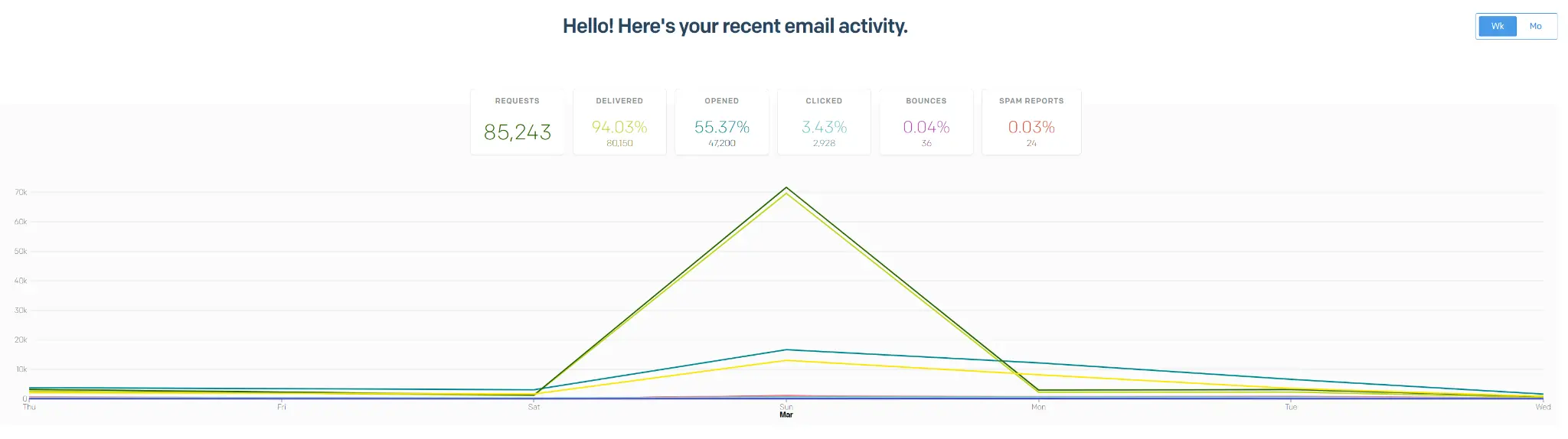
Most brokerages average a 20-30% open rate on their emails. We more than double that. We average a 55% open rate, which means over 200,000 people per month open our emails and are addicted to them. All while every email is reaching the individual traders of this broker.
Another video showing our results:
We will do the following for completely free:
I will personally audit your current entire e-mail process and tell you every single fix and point of improvement you should be making regarding email marketing, brand, direction and email tech
The stuff I just created? You do not have to worry about it. I will set it up for you fully. The campaigns, the flows, optimized and ready to launch. We do this within 24 hours.
ALL YOU NEED TO DO IS BOOK A 10 MINUTE CALL WITH ME
You walk me through your process. I give you a full audit and set everything up. Done.
I MEAN IT LIKE I'VE SAID IT,
LEAVE YOUR CREDIT CARD AT HOME
 Book a Call With Us
or email us at danilo@aimcompany.co
(and the process that has made our clients over 7 figures in deposits)
(we take care of the whole email marketing side)